• Home
  • Consulting Offerings
    • Copilot – AI
    • Workshops & Trainings
    • Assessments
    • Architecture design session
    • Proof of concept
    • Managed Services
    • Resources
  • Managed Services
  • E-Suite
    • E-Suite ofertas de descubrimiento
    • E-Visor
    • E-Visor Teams App
    • E-Vigilant
    • E-Inspector
    • E-Cryptor
    • E-Migrator
    • Resources
  • Solutions
    • Advanced Compliance
    • Secure Communications
    • Device Management
    • Threat Response
    • Identity Optimization
    • Information Protection
    • Resources
  • Events
  • About us
    • News and events
    • Careers
    • Partners
    • Microsoft FastTrack Ready Partner
    • Personal data processing policy
    • Terms & Conditions
    • Support
  • Blog
  • Sep 10
  • Comments (0)

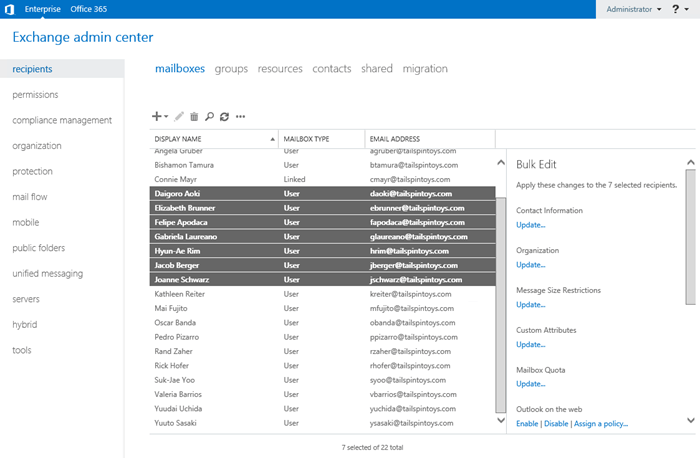
Microsoft announces the Retirement of the Classic Exchange Admin Center (EAC)

In April 202, Microsoft announced the general availability of the new Exchange admin center (EAC). The new EAC offers a faster, more secure, and more intelligent modern admin experience than the classic EAC and is helping admins work more efficiently. With the new EAC capable of assuming this responsibility and more, today Microsoft  are announcing the retirement of the classic EAC that will be fully retired on September 1, 2022.

This will be carried out in phases as Microsoft move forward. The initial phase will be moving the features under Protection to the Microsoft 365 Defender portal.

Key Points:

  • Major: Retirement
  • Timing:
    • October 15, 2021 – Move Protection and Advanced Threat features to the Microsoft 365 Defender portal
    • September 1, 2022 – Classic EAC will be retired


How this affects your organization:
In the initial phase, the following features will be moved to the Microsoft 365 Defender portal. Beginning October 15, 2021 users or Administrators will no longer be able to access these pages. If the user clicks on these features in Classic EAC, these feature pages will have a banner with a link to the new home for these features.

These features include:

  1. Safe Attachments
  2. Safe Links
  3. Malware Filter
  4. Connection Filter
  5. Spam Filter
  6. Outbound Spam
  7. Quarantine
  8. Action Center
  9. DKIM

What you need to do to prepare:

You can access the new EAC directly from https://admin.exchange.microsoft.com. Within the classic EAC, you will also find an opt-in toggle button, along with banners and links in the left navigation panel for the new EAC. Once you’ve opted in to moving to the new EAC, you’ll automatically be directed to the new EAC from the Microsoft 365 admin center.

For the features being moved, outlined above, Microsfot recommend that you start using the Microsoft 365 Defender portal to access these features.

We at Synergy Advisors are committed to working with clients to help them with their needs. if you need help ASAP. Support Page


We can help you quickly understand how to optimize your antispam and anti-malware controls to protect against complex attacks, via the latest protection technologies.
E-Suite Discovery Offerings E-mail Protection
 

  • Share:
Previous Article: Microsoft anuncia la retirada del Centro de Administración de Exchange clásico (EAC)
Next Article Acelere su camino hacia el trabajo híbrido seguro con nuestras nuevas ofertas E-Suite Discovery [EDO].

Categories

  • Awards and Recognitions
  • Blog
  • Blog-es
  • Collaboration
  • General
  • General News
  • Premios y reconocimientos
  • Solutions
  • Webinars

Recent Posts

  • Enhancing AI Security with Microsoft Defender for Cloud
  • Optimizing Enterprise Security with the New Copilot for Security Monitoring Dashboard
  • Synergy Advisors Accelerators for Secure Collaboration using Copilot for Microsoft 365

Categories

  • Awards and Recognitions
  • Blog
  • Blog-es
  • Collaboration
  • General
  • General News
  • Premios y reconocimientos
  • Solutions
  • Webinars

Secure Communications Solutions Catalog

  • Microsoft Teams Architecture Design Session
  • Microsoft Teams Event
  • Microsoft Teams Deployment
  • Microsoft Teams Security
  • Advanced Compliance
  • Device Magement
  • Secure Communications
  • Identity Optimization
  • Information Protection
  • Secure Communications
  • Threat Response

Offerings Catalog

  • Workshops and Trainings
  • Architecture Design Session
  • Assessments
  • Proof of Concept
  • Managed Services
  • Self-Service Teams training

Workshops Catalog

  • Enterprise Conditional Access Workshop
  • Cyber Security Defense ATP Workshop
  • Enterprise Data Loss Prevention Workshop
  • Information Protection Workshop
  • Microsoft Teams Workshop
  • Secure Azure Resources with Azure Security Center Workshop
  • App Identity Evaluation Workshop

Assessments Catalog

  • Microsoft Teams Assessment
  • M365 – Rapid Cybersecurity & Compliance Assessment
  • E-Visor Microsoft 365 Activity & Security Assessment

©2020 Synergy Advisors LLC. ALL RIGHTS RESERVED.

Contact Us at (+1) 425-689-3310 or through our Support Page